AI Agent Governance Platform

Claude Code Codex Cursor

Aggregate prompt history.
Raise safety and productivity together.

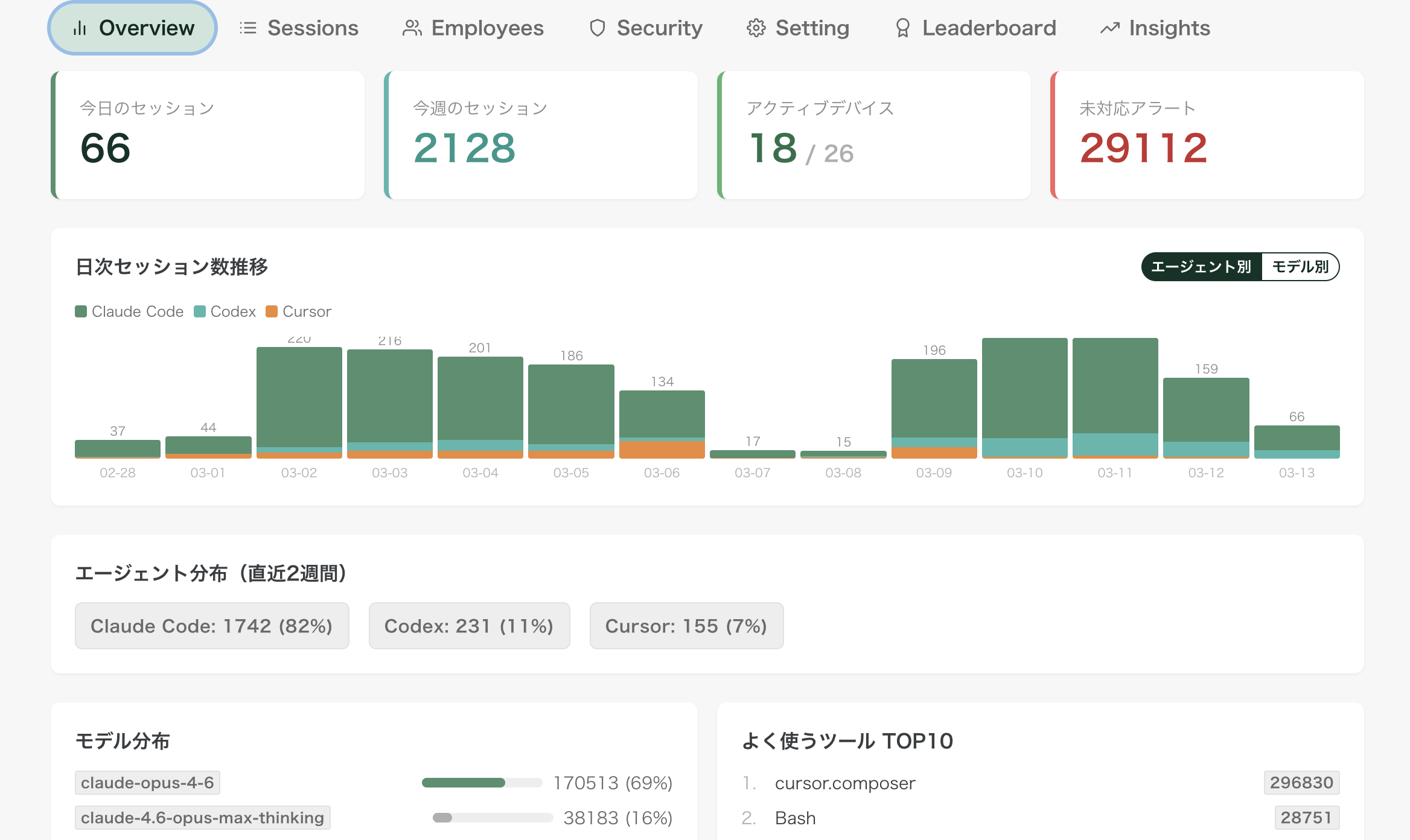
Renue Agent Monitor dashboard

Renue Agent Monitor aggregates the local history from Claude Code / Codex / Cursor and gives you usage statistics, risky-operation alerts, and concrete prompt improvement points — all in one place. Beyond the output itself, you can review how your team asked the AI and how they validated the answer.

From our internal operations, opened up externally Works for organizations and individuals Mac / Windows installers provided
Renue Agent Monitor dashboard
Catch risky operations early Continuously monitor access to secrets and risky prompt patterns.
See usage per user Make it visible who uses which AI and how.
Evaluate conversation quality Turn good prompting into organizational knowledge.

Collect

3

Aggregates Claude Code / Codex / Cursor local history.

Detect

24/7

Continuously watches for risky operations and secret access.

Review

Per user

Compare usage per user to see who is where on the adoption curve.

Improve

4 axes

Review-oriented scoring lifts the whole team's level.

Problem

Reviewing only the output misses the risky part of AI use

The more plausible output AI produces, the heavier output review becomes. But looking only at finished code never tells you how your team asked, whether secrets sneaked into prompts, or whether verification conditions were clear.

  • Risky prompts and pasted secrets end up hidden inside each person.
  • Good and bad usage alike fail to accumulate as team knowledge.
  • The know-how of heavy AI users never becomes the org-wide standard.

Solution

Collect the dialogue and turn it into an operable loop

Renue Agent Monitor externalizes the monitoring and evaluation system we run in-house. By aggregating usage logs and connecting statistics, alerts, and scoring, it raises AI usage maturity while protecting security.

Goal

Reward heavier AI users, and lift the whole team's level by looking at how the AI is actually used.

Core Functions

The core features that turn monitoring into improvement

Not just observation: a full loop from visibility to improvement actions.

01

Aggregate local history on the server

Collect scattered Claude Code / Codex / Cursor history from each device and make it reviewable in one place.

02

Show statistics and per-user usage

Volume, tool-level trends, per-user adoption — all laid out so you can see gaps and potential.

03

Risky-operation alerts and improvement scoring

Detects secret-access and other risky signals and returns concrete improvement scoring for your prompts.

Always On Collection

After setup, the hook runs itself on every employee's device

Once the agent is installed on each employee's device, hooks fire automatically as people use Claude Code / Codex / Cursor. No manual upload — usage logs, prompt history, and risky signals are sent to the server continuously.

Per-device continuous collection

Hooks on Mac / Windows watch activity and send relevant data as it happens.

Centralized across the whole team

AI usage logs scattered across employees are consolidated into an org-wide, comparable view.

Admins just read the Insight

Admins review the collected data on the dashboard and focus on alerts and improvement work.

What Gets Sent

What is automatically collected

Prompt / response historyRecords what was asked and how it was verified.
Usage statisticsSessions, messages, and active time.
Risk signalsDetects secret exposure and risky commands.
Improvement materialScores dialogue quality and surfaces points to review.

Screen Preview

Key screens beyond the dashboard — PC layout

From the usage ranking down to per-session detail and the security alert list — the set of screens needed for real operations.

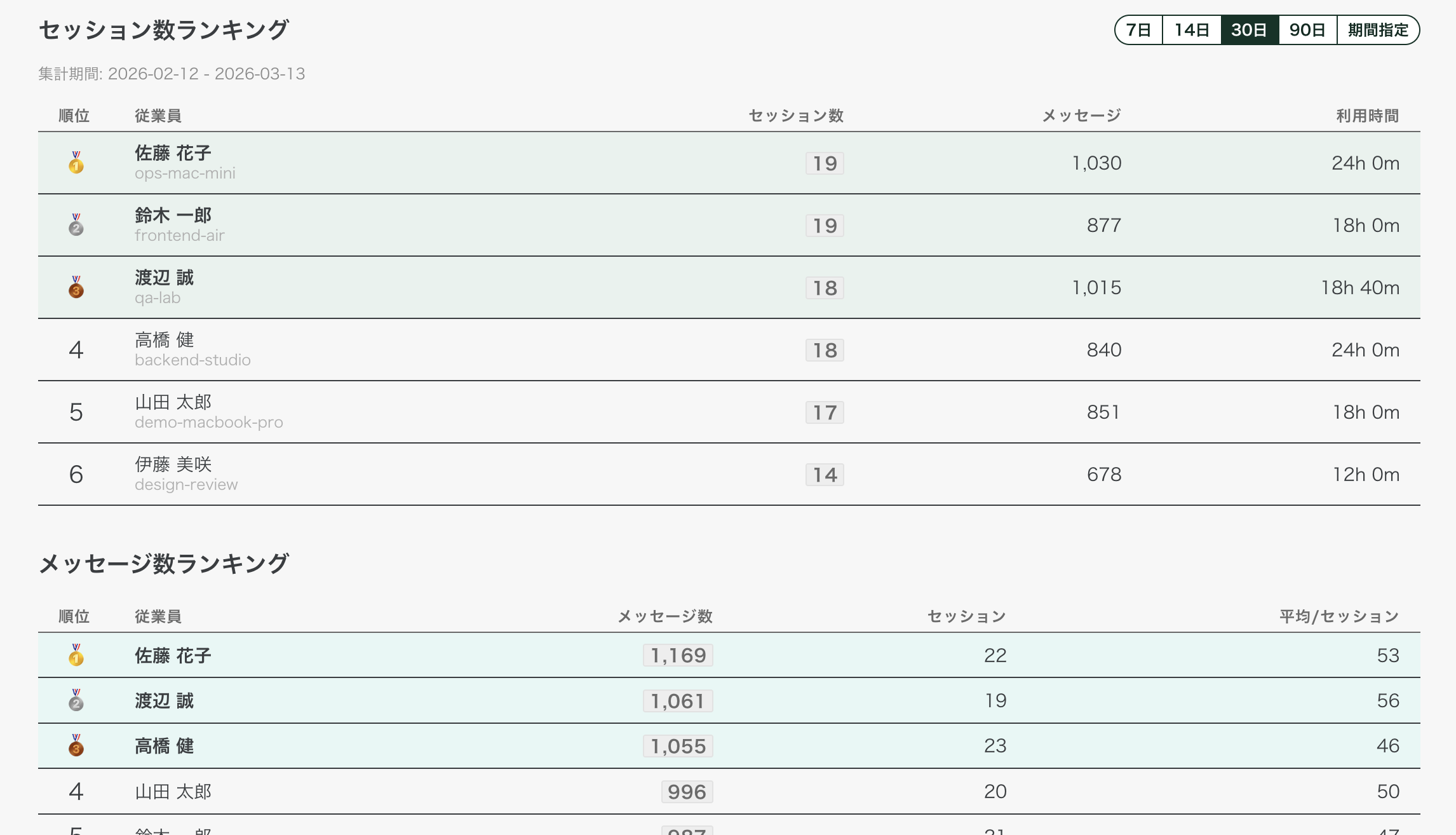
Ranking

Per-employee usage ranking

Compare sessions, messages, and active time per employee to spot heavy adopters and who needs help.

Per-employee usage ranking

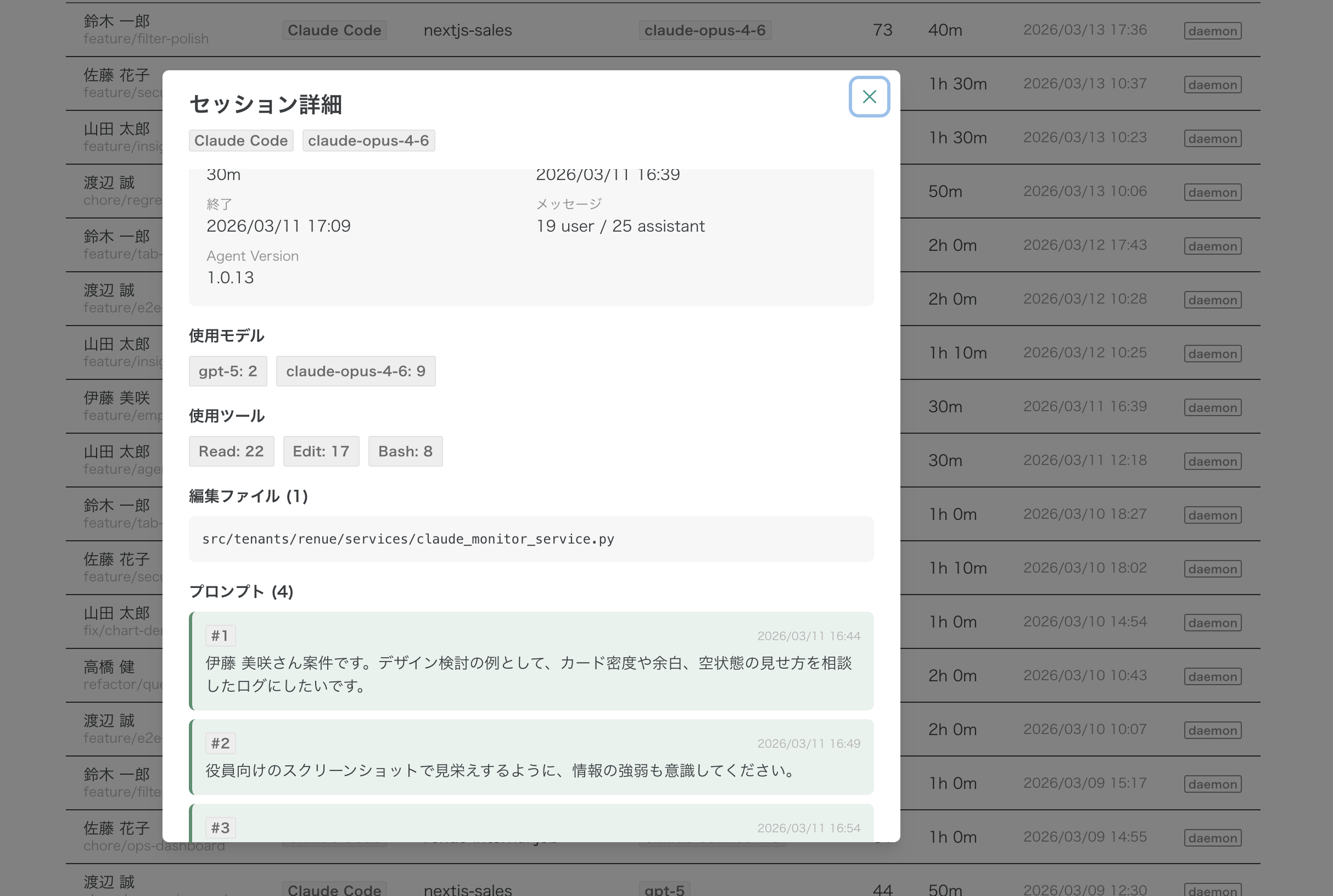
Session Detail

Session detail, one click from the list

Drill into the model used, tool calls, edited files, and actual prompt history — the dialogue behind each output.

Session detail, one click from the list

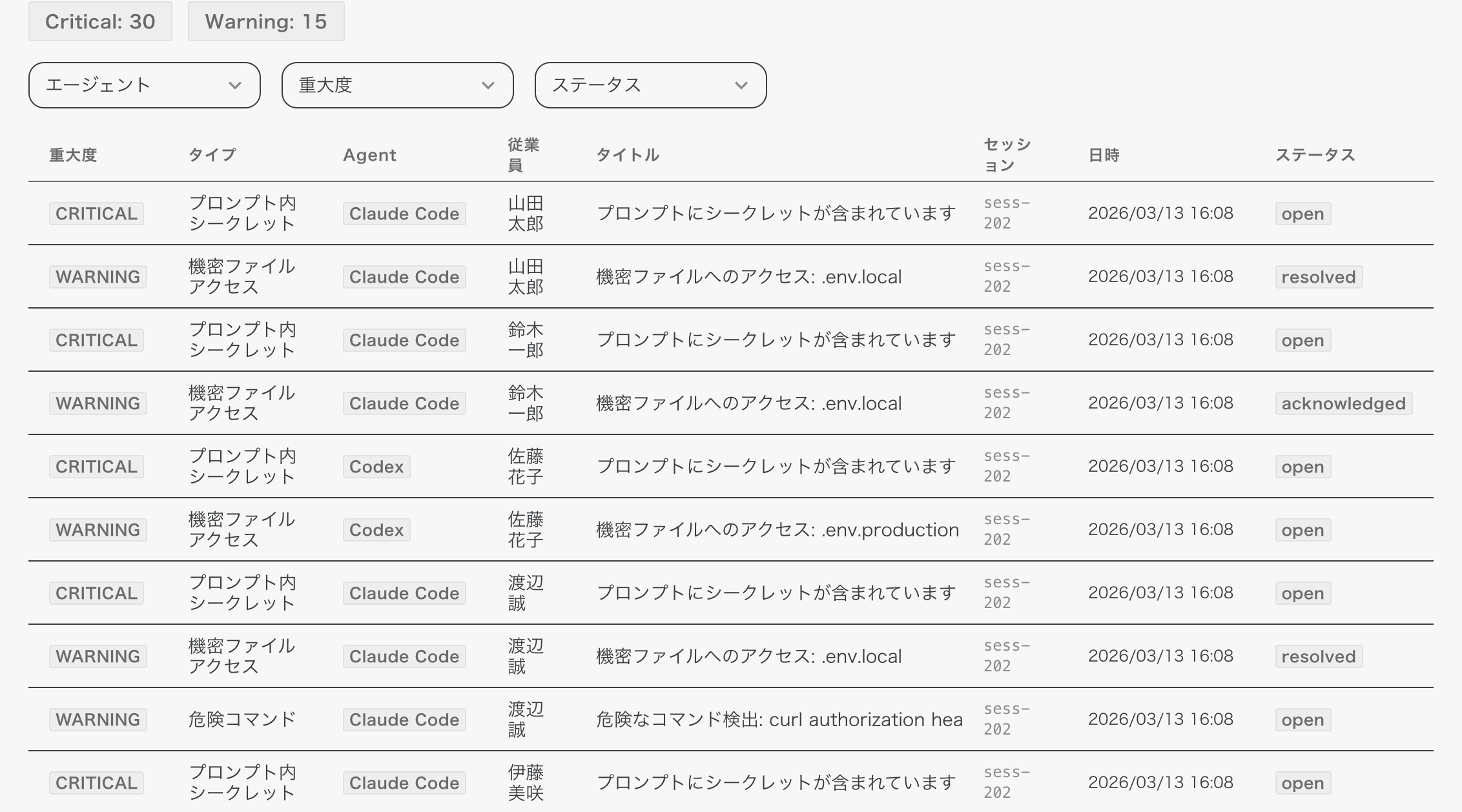
Security Alerts

Security alert list

Severity, type, affected employee, and status — track secret exposure and risky commands by priority.

Security alert list

AI Insight

Generative AI reads the usage and proposes improvements

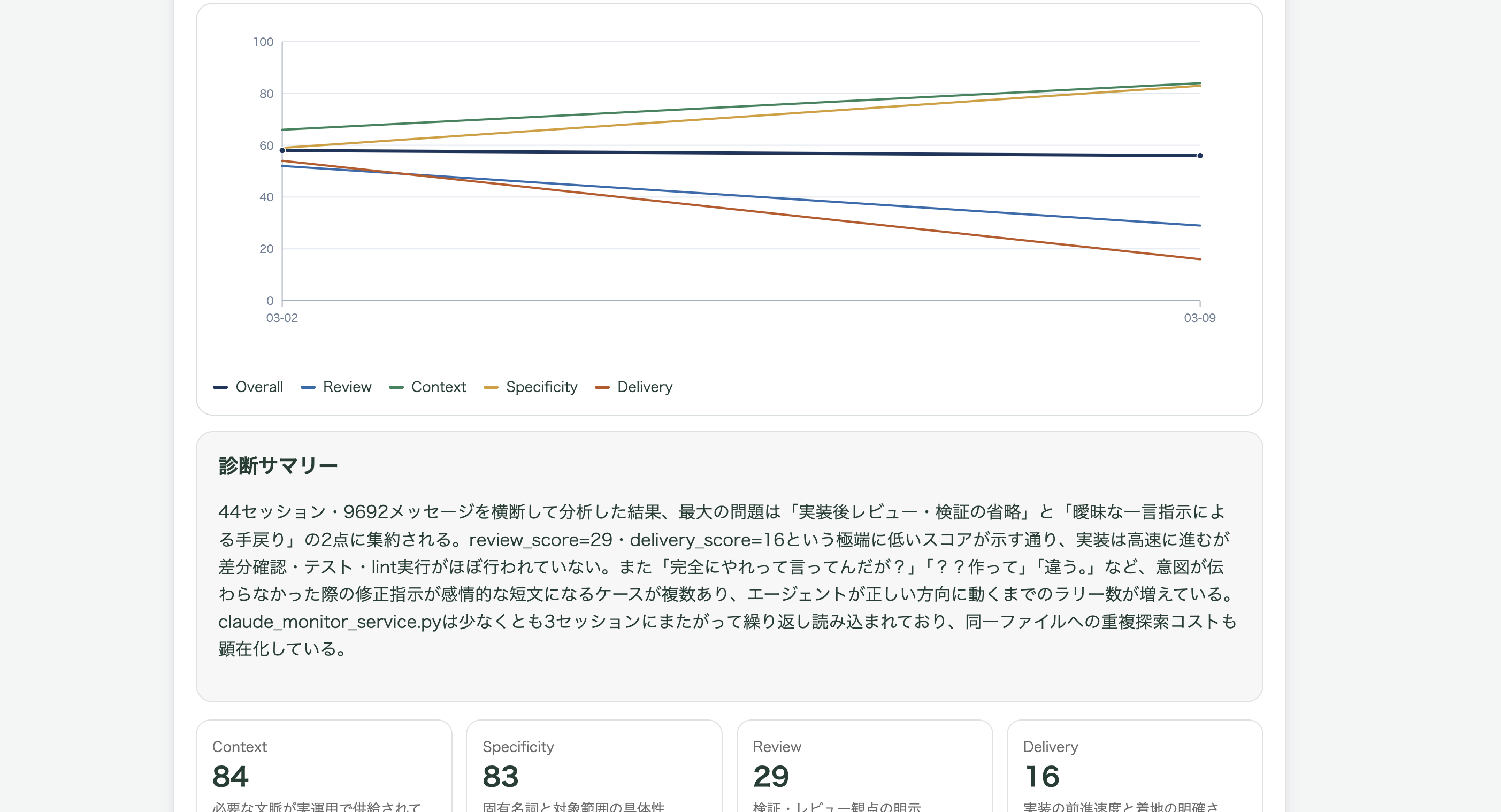
From collected sessions, scores, and work patterns, a generative model summarizes today's usage and points to concrete next things to fix.

Generative AI reads the usage and proposes improvements

MCP Extension

Analyze your own AI usage with an AI agent

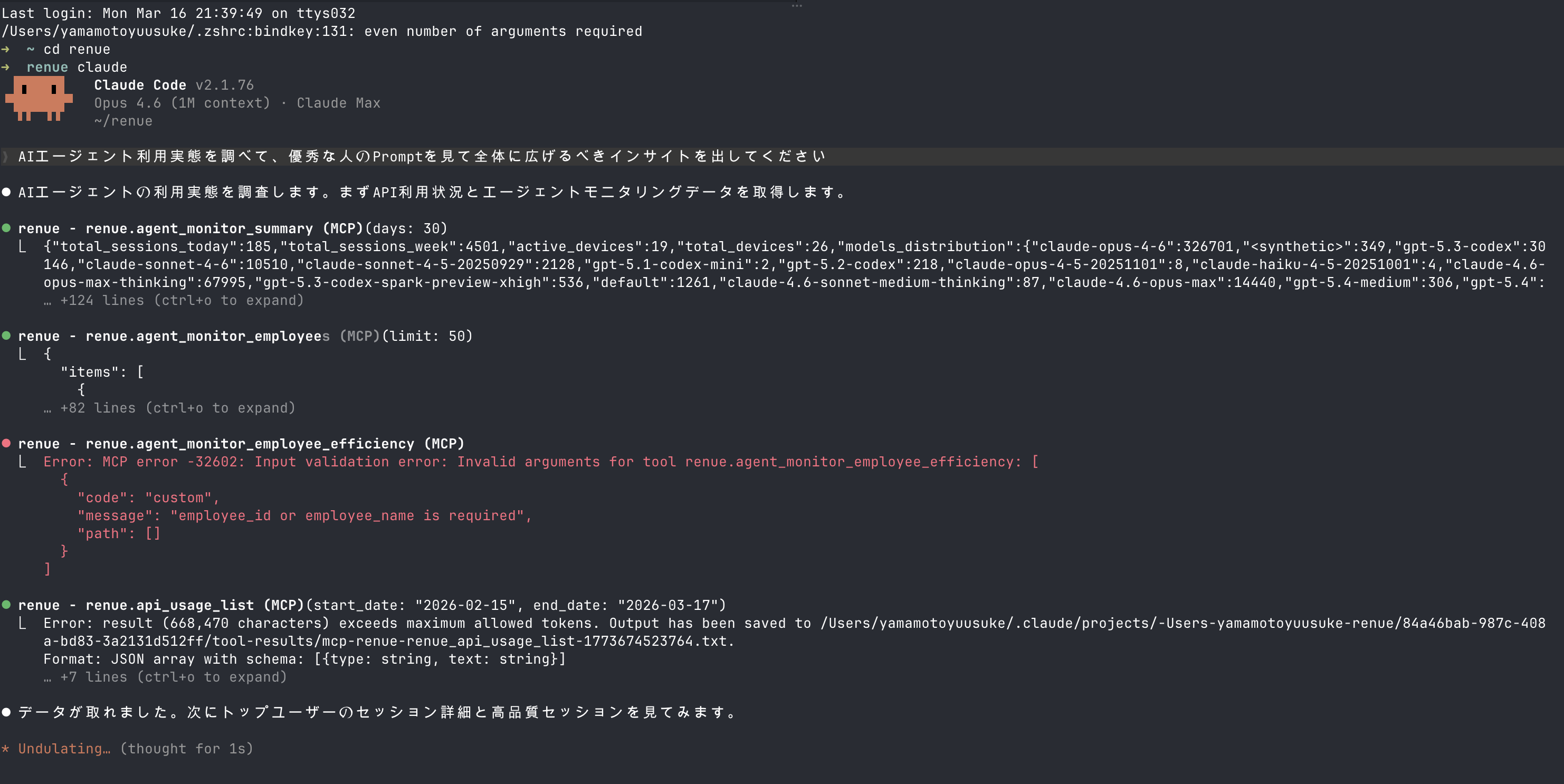
With the MCP (Model Context Protocol) extension, admins can pull monitoring data directly from agents like Claude Code and analyze it in place.

AI agents read your data and analyze on the fly

From Claude Code or other MCP-aware agents, access usage statistics, session detail, and per-employee data via the MCP server. With a natural-language request like "find patterns from heavy users and propose things worth spreading", the agent cross-analyzes your data.

Analyze by natural language Instead of driving a dashboard, ask the AI to analyze directly.
Cross-cutting access to all data Pull usage stats, session detail, per-employee efficiency, and security info in one go.
Drill in on your own angle Get company-specific insight beyond the fixed reports.
AI agents read your data and analyze on the fly
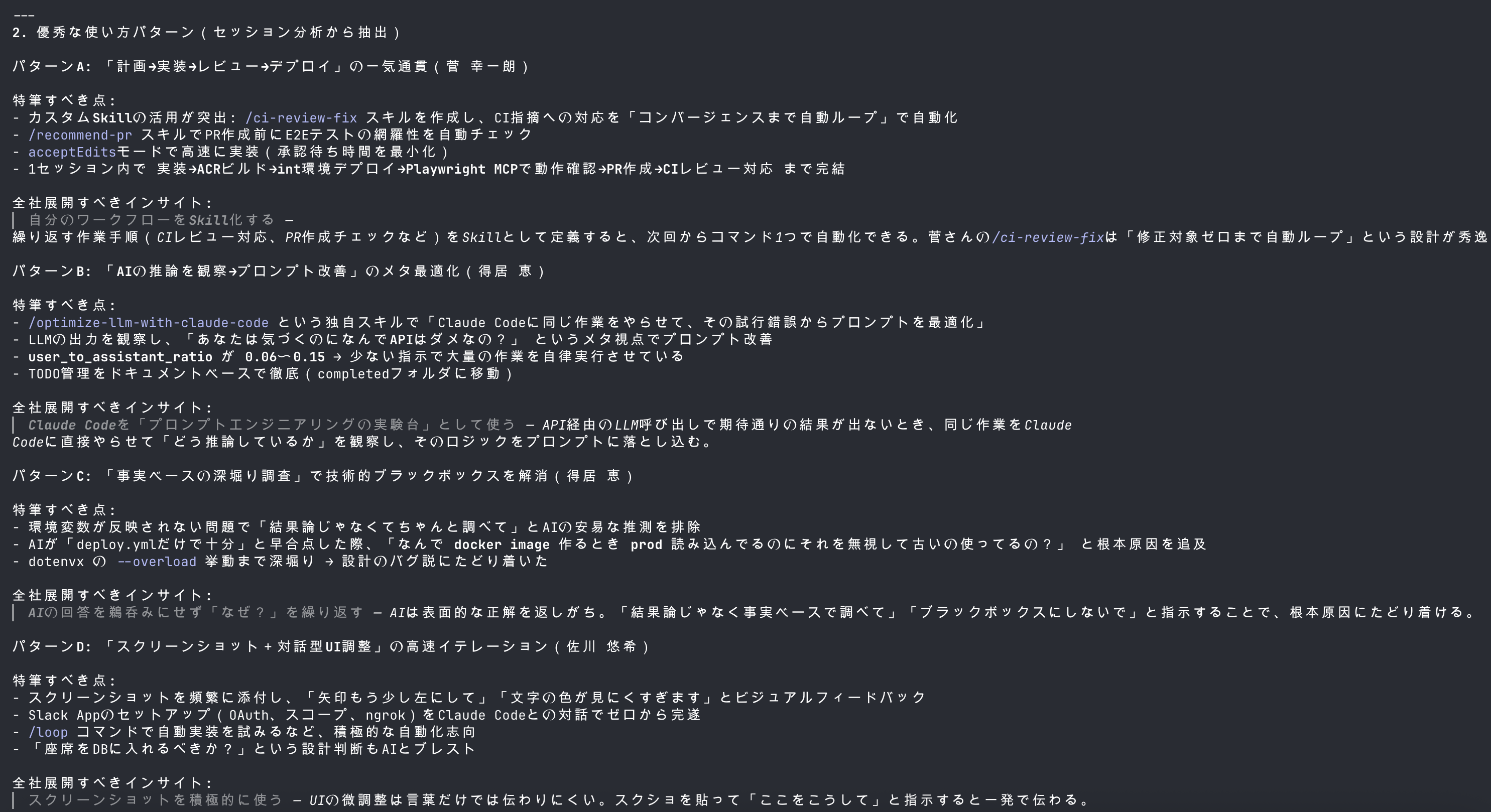
Spread top users' techniques to the whole team

Spread top users' techniques to the whole team

The agent compares session quality scores and patterns across your team — "who does what well", "which prompt patterns deserve to be spread" — and returns concrete next actions, not just numbers.

Note

The MCP extension is a paid add-on available after contacting us. It is not included in the free plan. If you're interested, please contact us.

How It Works

From onboarding to improvement

1

Create an account

Choose organization or individual use. Individuals can also start with Google / GitHub / X sign-in.

2

Connect devices

Distribute the Mac / Windows installer so targeted members can have their usage history continuously collected.

3

Read the Insight

Use usage stats, risky-op findings, and instruction-quality weak points to revise rules and prompt patterns.

Architecture

How collection works

Hooks fire on each employee's device, data flows to a central server, and admins see it in the dashboard.

Step 1

Each employee's PC

  • Uses Claude Code / Codex / Cursor
  • Set-up agent runs in the background
  • Hooks start automatically per employee

Step 2

Local hook / collector

  • Detects usage events
  • Extracts history, statistics, and risky operations
  • Shapes records for upload

Step 3

Renue Agent Monitor

  • Aggregates every employee's logs
  • Updates rankings and usage statistics
  • Generates alerts and improvement metrics

Step 4

Admin dashboard

  • Review per-employee ranking
  • Drill into session detail
  • Act on security alerts

Security

How we handle security

Encryption in transit, authenticated access, AI-based anonymization on social share — the set of mechanisms we use to handle data safely.

See the security details

Example review axes

  1. Whether purpose, constraints, and done-criteria are shared with the AI
  2. Whether secrets or risky operations are mixed into the prompt
  3. Whether the verification conditions for generated code are stated up front
  4. Whether the dialogue process can be reproducibly rolled out to the team